
SEOvault AI Merchant Mapping and Feed Reconciliation for WooCommerce
Product feeds fail for ordinary reasons: a brand is stored in a custom taxonomy, a GTIN lives in post meta, a variation uses a different identifier, or the price in the feed no longer matches the price in WooCommerce.
Those problems are easy to miss when product data, structured data, and the external feed are managed in separate places.
SEOvault AI Pro Merchant Mapping and Feed Reconciliation brings those checks into the Commerce SEO area of WordPress. Merchant Mapping connects your WooCommerce data sources to product schema fields. Feed Reconciliation compares an external XML, RSS, Atom, or CSV feed with WooCommerce and the generated product schema.
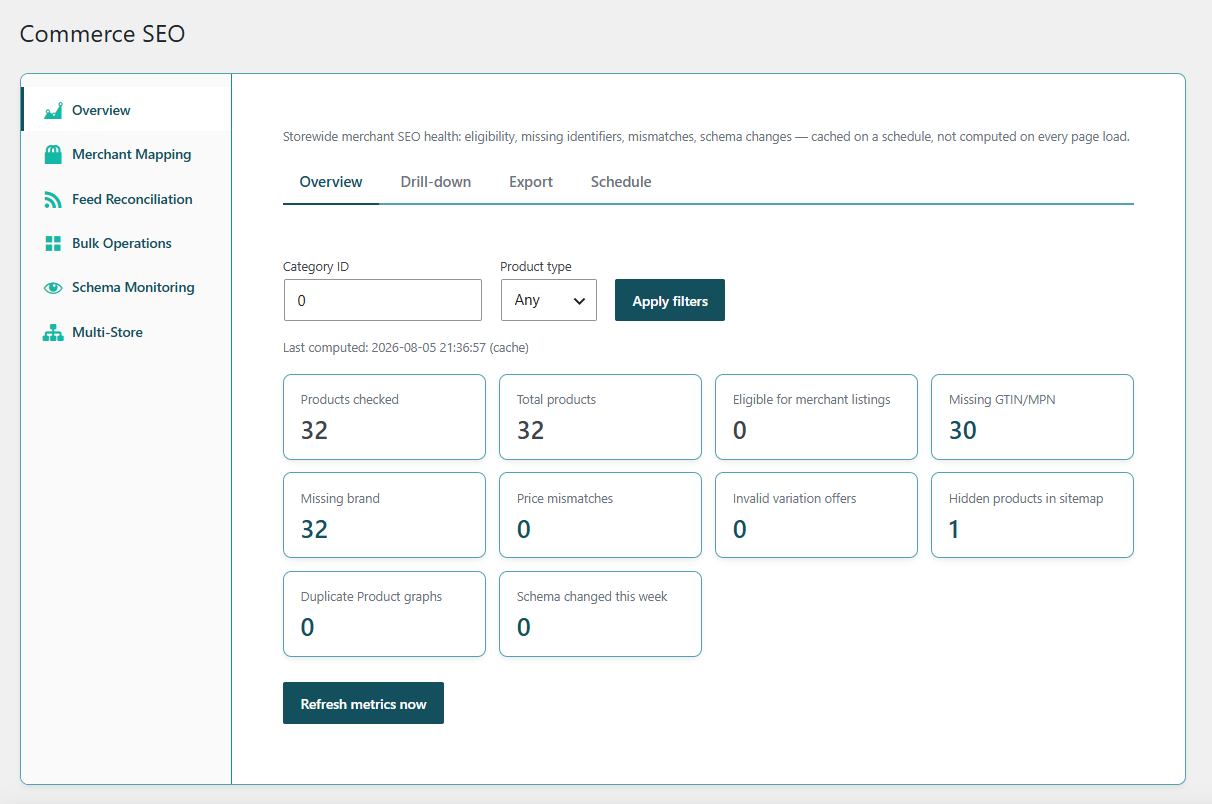
See Merchant Mapping and Feed Reconciliation on the SEOvault AI Pro page or compare the Pro license plans.
What the two features do
Merchant Mapping and Feed Reconciliation solve related but different problems.
Merchant Mapping
Merchant Mapping answers this question:
Where should product data come from when the schema needs brand, GTIN, MPN, condition, or another commercial field?
You create rules that map a WooCommerce taxonomy, product attribute, custom field, or fixed value into an allowed product schema field. The mapping is then applied to the product schema generated by the free SEOvault AI plugin.
Feed Reconciliation
Feed Reconciliation answers a different question:
Does the product feed that an external platform receives agree with WooCommerce and the product schema on the site?
You provide a feed URL, choose how products should be matched, and run a comparison. SEOvault AI stores the mismatches so you can review what differs and when the issue was found.
This is not a direct Google Merchant Center account connection. You provide a Google-compatible product feed URL, or a compatible CSV feed URL, and the plugin compares that feed against your WordPress data.
Merchant Mapping: connect product data to schema fields
WooCommerce product data is often spread across several sources. A brand may be a taxonomy. A manufacturer part number may be stored in custom meta. A condition may come from an attribute. Merchant Mapping lets you define those relationships instead of forcing every product to use the same storage pattern.
Supported mapping scopes
A mapping can apply at different levels:
- ✓ Global. Use a value or source across the product catalog.
- ✓ Category. Apply a rule to products in a category.
- ✓ Product. Target one product.
- ✓ Variation. Target a specific product variation.
More specific scopes take precedence over broader scopes. Variation rules can override product rules, product rules can override category rules, and category rules can override global rules.
Supported schema target fields
Merchant Mapping supports these product schema targets:
- ✓ Brand
- ✓ GTIN
- ✓ MPN
- ✓ SKU
- ✓ Item condition
- ✓ GTIN-8
- ✓ GTIN-12
- ✓ GTIN-13
- ✓ GTIN-14
- ✓ ISBN
The mapping resolver writes the values into the product schema structure. Brand values are emitted as a Schema.org Brand object. GTIN values use the configured GTIN type when one is set, and item condition values can be normalized into Schema.org condition URLs such as NewCondition, UsedCondition, or RefurbishedCondition.
Supported data sources
Each mapping can read from one of four sources:
- ✓ Static value. Use the same value for the matching scope.
- ✓ Product meta. Read a value from a WordPress custom field.
- ✓ Product attribute. Read a WooCommerce attribute from the product or variation.
- ✓ Taxonomy. Read the first matching term from a product taxonomy.
For variations, the resolver checks the variation first and can fall back to the parent product when the variation does not contain a value.
Priority, language, and fallbacks
Large catalogs often need more than one rule for the same field. Merchant Mapping includes the controls needed to make those rules predictable:
- ✓ Priority. Assign an order to competing mappings.
- ✓ Language targeting. Limit a mapping to a language, or leave language empty to make it apply to all languages.
- ✓ Fallback groups. Arrange alternative sources so the first useful value wins.
- ✓ Enabled state. Turn an individual mapping on or off without deleting the rule.
The resolver sorts applicable rules by scope specificity, priority, and mapping ID. It ignores empty source values and continues through the available fallback chain.
Preview and coverage tools
Merchant Mapping includes more than a form for creating rules. The Commerce SEO interface provides three useful views:
- ✓ Mappings. Review, create, edit, enable, disable, and delete mapping rules.
- ✓ JSON-LD Preview. Inspect how mapped values appear in a product’s structured data.
- ✓ Coverage. Scan published products for missing brand, GTIN, and item condition values after mapping resolution.
The coverage report gives you counts and sample product IDs for missing commercial fields, making it easier to identify where a mapping rule would have the most impact.
Feed Reconciliation: compare three data sources
Feed Reconciliation compares three product views when the information is available:
- WooCommerce data, including product identifiers, price, stock, and availability.
- SEOvault product schema, including the values emitted on the page.
- The external product feed, fetched from the feed URL you configure.
This three-way comparison helps distinguish a WooCommerce problem from a schema problem or a stale feed problem. For example, WooCommerce and the feed may agree while the page schema contains an older price. Or the schema and WooCommerce may agree while the external feed still contains an old identifier.
Feed formats and matching options
You can configure a feed using:
- ✓ Google XML, RSS, or Atom format
- ✓ CSV format
Products can be matched by:
- ✓ SKU
- ✓ GTIN
- ✓ Product ID
When SKU matching is selected and a feed item has no SKU, the reconciliation engine can use MPN as a fallback key. Products and feed items that cannot be matched are reported instead of disappearing silently.
The feed parser extracts common commercial fields, including:
- Product ID
- SKU
- GTIN
- MPN
- Brand
- Title
- Price
- Currency
- Availability
- Shipping
- Return policy
Mismatch types the system checks
Feed Reconciliation does not only compare prices. It records several classes of problems:
- ✓ Missing in feed. A WooCommerce product has no matching feed item.
- ✓ Missing in WooCommerce. A feed item has no matching WooCommerce product.
- ✓ Missing schema. The product does not expose the expected schema snapshot.
- ✓ Price mismatch. WooCommerce or schema price differs from the feed price.
- ✓ Currency mismatch. WooCommerce currency differs from the feed currency.
- ✓ Availability mismatch. Stock or schema availability differs from the feed.
- ✓ GTIN mismatch. The product, schema, and feed use different GTIN values.
- ✓ MPN mismatch. The manufacturer part number differs between sources.
- ✓ Brand mismatch. Brand data differs between WooCommerce, schema, and the feed.
- ✓ Shipping information. The feed provides shipping information that is not represented in WooCommerce or schema.
- ✓ Return policy information. The feed provides return policy information that is not represented in WooCommerce or schema.
Critical mismatches include price, availability, and commercial identifier conflicts. Informational rows, such as shipping or return policy data that has not been represented on the site, are still recorded for review.
Run comparisons manually or on a schedule
Feed Reconciliation supports manual runs and scheduled comparisons. Available recurrence options are:
- Disabled
- Hourly
- Twice daily
- Daily
A run records the number of feed items, matched products, mismatches, and errors. History can be retained by run count and by number of days.
The schedule is disabled by default. That lets you begin with a manual comparison, review the result, and enable recurring checks only when the feed and matching strategy are ready.
Alerts without admin-noise
The module adds critical unresolved mismatches to the SEOvault AI Action Center with a link to the mismatch view. It does not create a persistent WordPress admin notice for every problem.
Optional email alerts can also be enabled. When enabled, the module sends an email only when critical unresolved mismatches exist. Email can use a configured address or the site’s WordPress admin email.
This keeps the warning useful instead of turning every feed difference into a permanent notification.
How Merchant Mapping and Feed Reconciliation work together
These features are most useful when used as a loop:
- Find the gap. Use the coverage report or reconciliation results to identify missing or conflicting product data.
- Create the rule. Map the correct taxonomy, meta field, attribute, or static value to the product schema field.
- Preview the result. Inspect the product JSON-LD before relying on the new mapping across the catalog.
- Run reconciliation. Compare the updated site schema and WooCommerce data against the external feed.
- Review remaining mismatches. Resolve data that is genuinely different instead of blindly overwriting one system with another.
- Schedule checks. Enable recurring comparisons when the feed is stable and the team is ready to act on the alerts.
The important distinction is that Merchant Mapping changes the site’s schema output. Feed Reconciliation observes and reports differences. It does not overwrite WooCommerce product data or directly push products into Google Merchant Center.
WooCommerce and the free plugin foundation
Merchant Mapping and Feed Reconciliation require the free SEOvault AI plugin and WooCommerce product data. The free plugin supplies the product schema foundation. Pro adds the mapping rules, schema preview, coverage report, external feed fetching, reconciliation engine, mismatch history, and alerts.
What this does not guarantee
Matching a feed to WooCommerce does not guarantee Merchant Center approval, product visibility, free listing eligibility, or rich results. External platforms apply their own policies, account requirements, product restrictions, and review systems.
The practical benefit is control and visibility:
- Product values have a defined source.
- Schema fields can be filled from the data you already maintain.
- Product and variation rules can be prioritized.
- External feed differences are visible instead of hidden.
- Critical mismatches can be reviewed before they become expensive surprises.
See Commerce SEO in the product
The Merchant Mapping and Feed Reconciliation section on the SEOvault AI Pro page shows the Commerce SEO interface and the module’s relationship to the other Pro features. The Pro page links back to this guide with the Read the Commerce SEO guide button.
If you manage a WooCommerce catalog with custom product fields, multiple brands, variations, external feeds, or frequent price and stock changes, compare the SEOvault AI Pro plans.