
SEOvault AI Video SEO: Video detection, VideoObject schema, and video sitemaps
Video can be one of the strongest assets on a page, but search engines need more than a video player embedded in the content. They need enough information to understand the video, identify its thumbnail, connect it to the page, and decide whether it is eligible for video search features.
That becomes harder when a site uses several video providers, page builders, custom fields, lazy-loaded players, and hundreds of older posts.
SEOvault AI Pro Video SEO is designed for that workflow. It detects videos, fetches provider metadata asynchronously, lets you review and edit each video, adds VideoObject data to the SEOvault AI schema graph, and publishes a dedicated video sitemap.
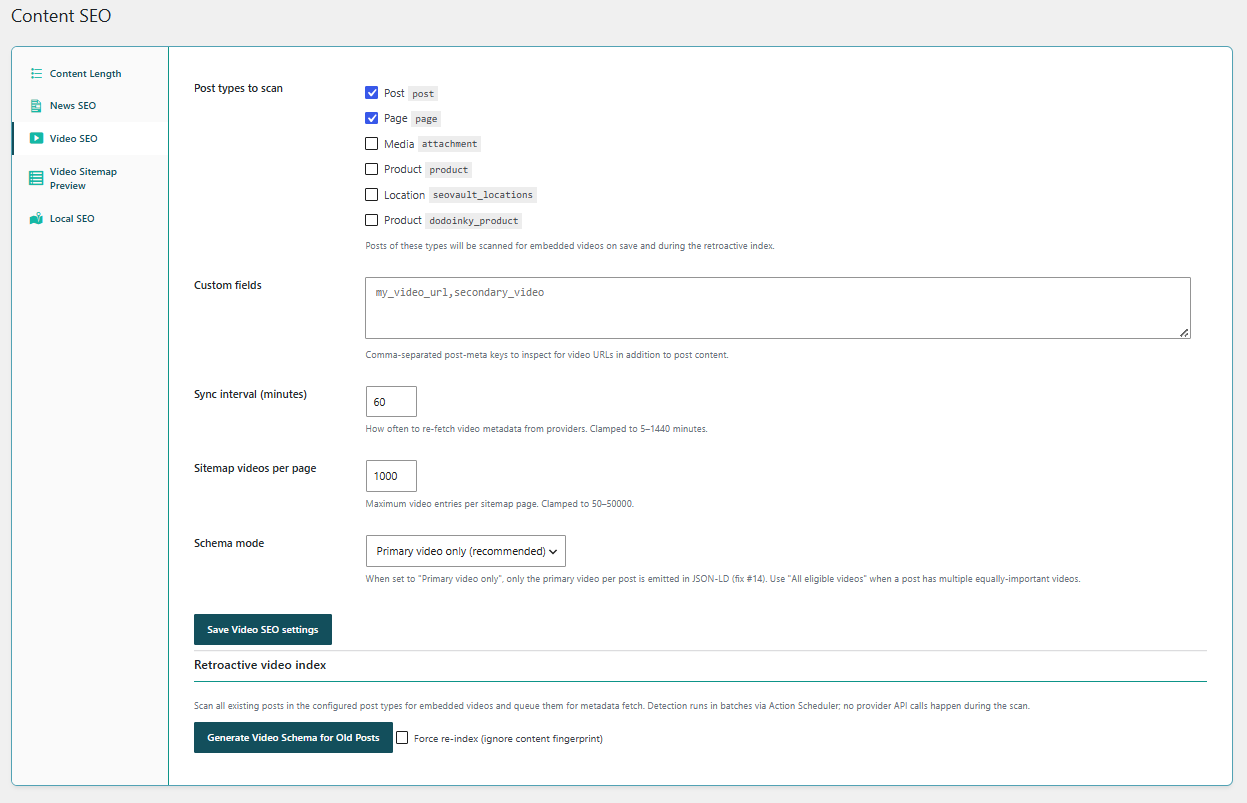
See the Video SEO module on the SEOvault AI Pro page or compare the Pro license plans.
What Video SEO adds
SEOvault AI Pro brings detection, indexing, schema, sitemap, editor, synchronization, validation, and administration tools into one WordPress workflow.
Video SEO is disabled by default. Enable it from the Pro Modules dashboard before saving Video SEO settings, indexing posts, or running the bulk index. The module also depends on the free SEOvault AI plugin for its schema graph integration.
Twelve provider handlers in the default registry
Video SEO covers more than one YouTube URL pattern. The default provider list contains twelve handlers, with specific providers recognized before generic self-hosted video URLs.
- ✓ YouTube. Detect YouTube video URLs and build the corresponding player and thumbnail information.
- ✓ Vimeo. Detect Vimeo videos and resolve their player information.
- ✓ Dailymotion. Detect Dailymotion video URLs.
- ✓ Wistia. Detect Wistia media and build Wistia player data.
- ✓ Brightcove. Detect Brightcove videos, including player URLs that contain account and video identifiers.
- ✓ TED. Detect TED talks and build the embed information.
- ✓ VideoPress. Detect WordPress.com VideoPress videos.
- ✓ Facebook. Detect supported Facebook video URLs.
- ✓ HLS. Detect HLS manifest URLs such as
.m3u8streams. - ✓ DASH. Detect MPEG-DASH manifest URLs such as
.mpdstreams. - ✓ Self-hosted video. Detect direct video files and self-hosted media URLs.
- ✓ Embedly fallback. Use Embedly for providers that are not recognized by the dedicated handlers when an Embedly API key is available.
Provider-specific host allowlists keep metadata requests limited to recognized video sources rather than allowing unrestricted server-side URL fetching.
Detection runs on content, custom fields, and older posts
Video SEO can scan the public post types you select in the settings. The module supports three ways to find videos:
- ✓ Content scanning on save. When a configured post is saved, the detector looks for supported video embeds and URLs.
- ✓ Custom field scanning. Add comma-separated post-meta keys such as
my_video_urlorsecondary_videofor video URLs stored outside the main post content. - ✓ Retroactive indexing. Scan existing published posts after enabling the module instead of waiting for every post to be edited again.
- ✓ Block editor detection. The block parser inspects block content for video URLs.
- ✓ Page-builder detection. The module includes integrations for Elementor, Bricks, and Oxygen when those builders are active.
- ✓ Content fingerprinting. The indexer can avoid repeating the same detection work when the content has not changed, while the force re-index action can run detection again.
Detection is deliberately separated from metadata fetching. The fast scan finds candidate URLs first. Provider requests happen later through asynchronous actions, so saving a post does not need to wait for every remote provider response.
A Video SEO metabox for each post
The module adds a Video SEO metabox to the configured post types in the WordPress editor. It uses a React interface and supports both the block editor and the classic editing workflow.
Inside the metabox, you can:
- ✓ Add a video by URL.
- ✓ Mark one video as the primary video.
- ✓ Exclude a video from schema and sitemap output.
- ✓ Re-sync provider metadata.
- ✓ Override the title and description.
- ✓ Set a custom thumbnail URL.
- ✓ Add custom tags.
- ✓ Set duration, priority, category, allowed regions, and content rating.
- ✓ Mark a video as requiring a subscription.
- ✓ Review the detected stream format.
- ✓ Set broadcast status and broadcast dates.
- ✓ Add a transcript or caption URL.
- ✓ Add chapters with start time, end time, and title.
- ✓ Validate whether the player URL and thumbnail URL are reachable.
This gives the editor control over the information that automated provider metadata cannot always provide. For example, a publisher may want a clearer editorial title, a custom thumbnail, or a transcript URL even when the embedded player itself has not supplied those values.
VideoObject schema connected to the page graph
Video SEO injects VideoObject nodes into the free SEOvault AI plugin’s schema graph. It uses the same stored video rows that the sitemap reads, so the schema and sitemap do not depend on separate manually maintained data.
The schema builder can emit:
- ✓
name,description,thumbnailUrl, anduploadDate. - ✓
durationin ISO 8601 format. - ✓
contentUrlandembedUrlwhen the URLs are valid. - ✓ Video width and height.
- ✓ Family-friendly status.
- ✓ View counts through
InteractionCounterandWatchAction. - ✓ Author name and author URL.
- ✓ Keywords from stored tags.
- ✓ Allowed regions.
- ✓ Content rating.
- ✓ Subscription requirements.
- ✓ A reference connecting the video to the page’s
WebPagegraph entity. - ✓ Transcript and caption information when supplied.
- ✓ Chapter information when supplied.
The module requires the core fields needed to build a useful VideoObject. If the title, description, thumbnail, or upload date cannot be resolved, it does not emit an incomplete VideoObject entry. The description can fall back to the post excerpt, and the upload date can fall back to the post publication date.
Choose how many videos a post emits
A post can contain more than one video. Video SEO provides two schema modes:
- Primary video only, which is the recommended default. Only the post’s primary eligible video is emitted in JSON-LD.
- All eligible videos, for posts where several videos are equally important.
Every emitted video still passes the same eligibility checks. Changing the mode does not bypass exclusion settings, missing data, post-type configuration, or other eligibility rules.
A dedicated video sitemap
The module publishes a video sitemap at /video-sitemap.xml and supports paginated sitemap files as the number of eligible videos grows.
- ✓ Video sitemap index.
- ✓ Paginated video sitemap files.
- ✓ XSL stylesheet for a human-readable sitemap view.
- ✓ Video title, description, thumbnail, player, and content information for eligible entries.
- ✓ Per-video exclusion filtering.
- ✓ Priority and category filtering.
- ✓ WPML and Polylang-aware sitemap handling.
- ✓ Language-specific sitemap routes where multilingual plugins are active.
The sitemap is not a guarantee that every video will appear in video search. It gives search engines a structured way to discover eligible video information and gives the site a consistent output surface to inspect and validate.
Bulk indexing and recurring synchronization
A new site may already contain hundreds of posts with embedded videos. Video SEO includes a retroactive index instead of requiring a manual edit of every post.
The bulk workflow provides:
- ✓ Bounded batches for large sites.
- ✓ Progress tracking through the existing batch infrastructure.
- ✓ Cursor-based continuation between batches.
- ✓ Cancellation and resume behavior.
- ✓ A force re-index option.
- ✓ Separate asynchronous metadata fetch actions after detection.
- ✓ A configurable provider metadata sync interval.
- ✓ Retry handling for provider requests.
The module also exposes WP-CLI commands for video indexing, synchronization, validation, and status checks. That gives developers and agencies a way to run or inspect the process without relying only on the WordPress admin interface.
Thumbnails, feeds, and secondary search signals
Video SEO includes several outputs beyond the main JSON-LD graph and sitemap:
- ✓ Optional local thumbnail downloading.
- ✓ Media RSS video entries.
- ✓ Yandex video Open Graph tags.
- ✓ Video deep links that support timestamp-based seeking through
?t=URLs. - ✓ An admin sitemap preview.
- ✓ REST validation routes for checking player and thumbnail reachability.
- ✓ A WordPress dashboard widget with the current Video SEO state and recent video information.
These outputs serve different purposes. The schema describes the video to structured-data consumers. The sitemap improves discoverability. Media RSS supports feed consumers. The dashboard and validation tools help the site owner find incomplete or unreachable data before publishing.
What Video SEO does not promise
Video SEO can prepare clearer technical signals, but it cannot guarantee a rich result, a video thumbnail, a top ranking, or inclusion in a particular search feature. Search engines still decide whether a page and video are eligible and how they should be displayed.
The honest promise is narrower and more useful:
- Detect supported video sources across a site.
- Store and enrich the metadata needed for structured output.
- Keep schema and sitemap data connected.
- Give editors control over primary, excluded, and custom video details.
- Provide bulk and scheduled workflows for sites with a large video library.
Free plugin foundation and Pro extension
Video SEO requires the free SEOvault AI plugin because Pro adds its VideoObject nodes to the free plugin’s schema graph. Pro is an extension of the free plugin, not a replacement for it.
The free plugin provides the base WordPress SEO and schema foundation. Video SEO adds video-specific detection, metadata, schema, sitemap, and administration workflows on top of that foundation.
See Video SEO in the product
The Video SEO section on the SEOvault AI Pro page shows the module next to its current settings screenshot. The Pro page links back to this guide with the Read the Video SEO guide button.
If you need the module for a single site, compare the Single plan. If you manage multiple WordPress properties, compare the Business and Agency plans for additional activations.