
SEOvault AI News SEO: News sitemaps, NewsArticle schema, and editorial controls
Publishing news content at scale creates a different SEO problem from maintaining a normal blog.
A newsroom needs to control which post types enter its news sitemap, which terms are excluded, how each article is classified, and which details belong in the article’s structured data. It also needs a workflow that does not turn every post into a manual technical SEO task.
SEOvault AI Pro News SEO brings those controls into WordPress. It combines a Google News sitemap, NewsArticle schema, per-post editorial fields, multilingual filtering, optional IndexNow notifications, and migration tools for existing News SEO settings.
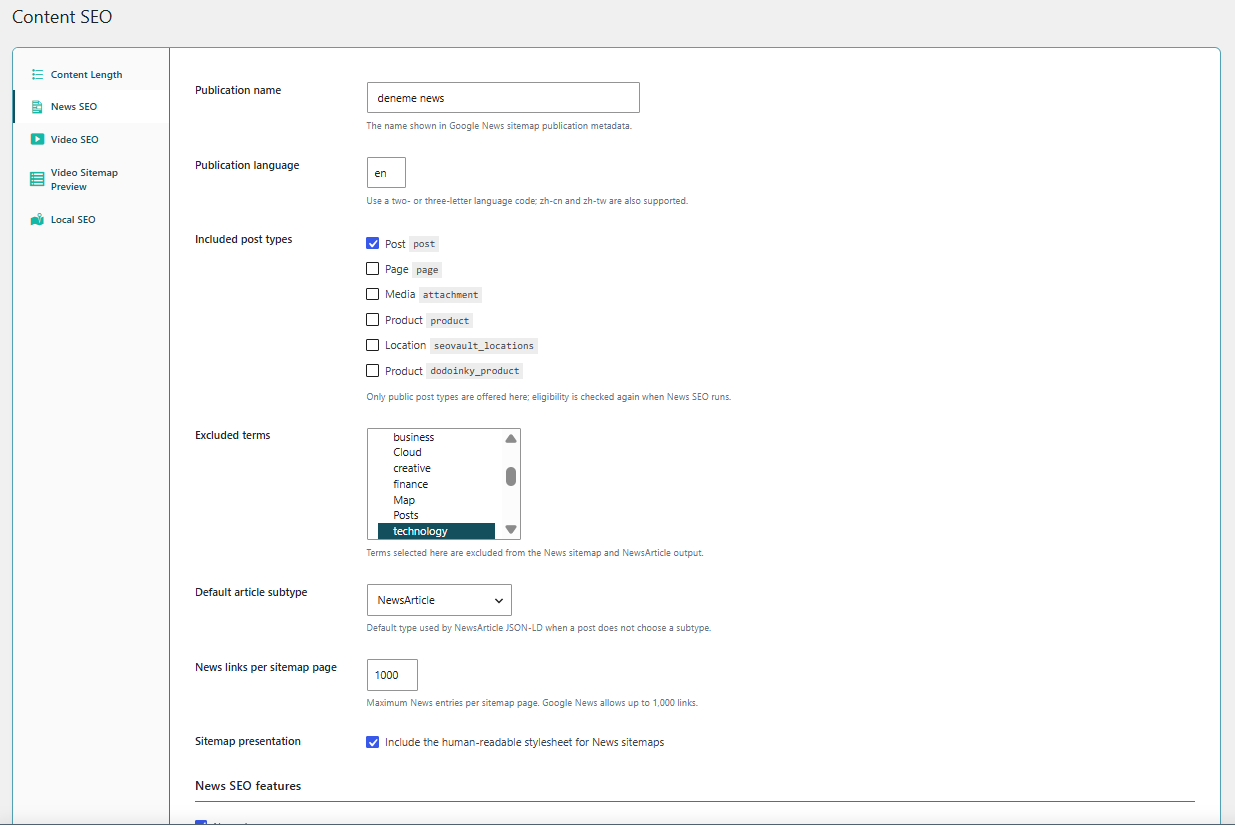
See the News SEO module on the SEOvault AI Pro page or compare the Pro license plans.
News SEO settings for the whole publication
Start with the rules that apply to the publication as a whole:
- ✓ Publication name. Set the name that appears in the News sitemap publication metadata.
- ✓ Publication language. Set a two- or three-letter language code, including supported codes such as
zh-cnandzh-tw. - ✓ Included post types. Choose which public post types can contribute to the News sitemap.
- ✓ Excluded terms. Exclude selected taxonomy terms from the News sitemap and NewsArticle output.
- ✓ Default article subtype. Choose the default NewsArticle type used when an individual post does not select another subtype.
- ✓ Sitemap size control. Configure the number of News entries per sitemap page, up to Google’s documented limit of 1,000 links.
- ✓ Human-readable sitemap stylesheet. Include an XSL stylesheet so the News sitemap can be inspected in a browser.
News SEO is disabled by default. Once the module is enabled, these settings and the individual News SEO feature toggles control how the workflow operates.
A News sitemap built for active news content
The module publishes a dedicated News sitemap at:
/news-sitemap.xmlIt also supports paginated sitemap files and language-specific routes when multilingual filtering is enabled.
The sitemap includes only eligible content. The eligibility rules account for:
- ✓ Published status
- ✓ Configured post types
- ✓ Password-protected content
- ✓ The Google News publication window
- ✓ Per-post exclusion settings
- ✓ Noindex state
- ✓ Excluded taxonomy terms
- ✓ Optional WPML or Polylang language conditions
News sitemap entries use a 48-hour publication window. The sitemap is also connected to the free SEOvault AI sitemap index, so the News sitemap can be discovered alongside the site’s other sitemap outputs.
When there are no eligible posts, the endpoint returns a valid empty sitemap rather than creating a broken or misleading result. That matters for publications whose news output is seasonal or temporarily quiet.
NewsArticle schema that works with the free plugin’s graph
News SEO does not create a disconnected second article entity beside the free plugin’s schema. It transforms the existing Article or BlogPosting node into a NewsArticle type while preserving its identity and relationships.
That allows the news-specific schema to keep the article’s existing:
- Author
- Publisher
- Image
- Main entity of page
- Publication date
- Modified date
- Graph identity and relationships
The module can use the standard NewsArticle type or more specific Schema.org subtypes, including:
- ✓
NewsArticle - ✓
AnalysisNewsArticle - ✓
AskPublicNewsArticle - ✓
BackgroundNewsArticle - ✓
OpinionNewsArticle - ✓
ReportageNewsArticle - ✓
ReviewNewsArticle
If the free plugin does not provide an Article node for a particular situation, News SEO can build a NewsArticle fallback using the available post and publication data.
The enhanced schema can add:
- ✓ Dateline
- ✓ News keywords
- ✓ A news-specific image
- ✓ Copyright year
- ✓ Copyright holder
- ✓ The selected article subtype
The result is a connected article graph with news-specific information, rather than duplicate Article and NewsArticle entities competing with each other.
Per-post editorial controls
News SEO adds a News SEO metabox to configured news post types. The block editor uses the React interface, while the classic editor receives the equivalent fields directly.
Editors can control each article with these fields:
- ✓ Exclude from News output. Remove a post from the News sitemap and NewsArticle schema.
- ✓ Google News noindex behavior. Excluded posts also receive
googlebot-news: noindexon the frontend. - ✓ Stock tickers. Add up to five exchange-prefixed tickers when a financial entity is a main subject of the article.
- ✓ Article subtype. Override the publication default for an individual article.
- ✓ News keywords. Add up to ten comma-separated news keywords.
- ✓ Dateline. Add the location or dateline associated with the article.
- ✓ News image. Choose an image specifically for the NewsArticle output.
These fields give editors control over the details that are different from ordinary post SEO. A report, an opinion piece, a review, and a breaking-news article do not always need the same subtype or editorial metadata.
IndexNow notifications for eligible news posts
IndexNow can notify participating search engines when a new eligible news article is published.
The workflow is deferred rather than making an external request inside the publishing action:
- A new article transitions to
publish. - News SEO checks whether the article is eligible.
- A background job is queued.
- The IndexNow notification is sent by the worker.
- The latest result is available for administration and diagnostics.
IndexNow is opt-in. The module creates and serves the verification key file required by the protocol and sends notifications to the official IndexNow endpoint only when the feature is enabled.
IndexNow can speed up notification of a changed URL. It does not guarantee crawling, indexing, Google News inclusion, or rankings.
Multilingual News SEO
News publications often publish the same story in multiple languages. News SEO includes language-aware sitemap filtering for WPML and Polylang.
- ✓ Filter News sitemap entries by language.
- ✓ Generate language-specific News sitemap routes.
- ✓ Keep the shared eligibility rules while applying the active language condition.
- ✓ Use the publication language setting for the sitemap metadata.
When neither WPML nor Polylang is active, the multilingual filter remains inactive and the normal News sitemap behavior continues.
Import settings from other News SEO plugins
Migrating a publication should not require rebuilding all of its News SEO settings manually. News SEO includes import endpoints for supported configurations from:
- ✓ Yoast News SEO
- ✓ Rank Math News SEO
The import workflow can bring across publication settings, included post types, excluded terms, and relevant per-post values such as the News exclusion state and stock tickers.
The goal is to preserve the publication’s existing News SEO decisions while moving the technical output into SEOvault AI Pro.
Dashboard and Site Health visibility
News SEO also provides operational visibility after setup:
- ✓ A WordPress dashboard widget for current News SEO status.
- ✓ Recent news article information.
- ✓ The latest IndexNow result when IndexNow is enabled.
- ✓ A direct configuration link.
- ✓ Site Health diagnostics for News SEO configuration.
- ✓ A News sitemap accessibility check.
- ✓ An IndexNow key-file accessibility check.
This makes it easier to find configuration problems before they become invisible coverage issues in search tools.
Feature toggles and defaults
The News SEO settings surface includes separate controls for the main feature areas:
- News sitemap
- News post metabox
- NewsArticle schema
- IndexNow ping
- News dashboard widget
- Multilingual News SEO
The sitemap, metabox, schema, dashboard widget, and multilingual features are enabled by default within the module configuration. IndexNow is opt-in and must be enabled deliberately.
The overall News SEO module itself is disabled until it is enabled from the Pro Modules dashboard. The free SEOvault AI plugin is also required because News SEO extends its article schema graph.
What News SEO does not promise
News SEO improves the technical organization and discoverability of a publication’s content. It does not guarantee that Google News will accept, crawl, index, rank, or display a particular article.
Search engines still evaluate the publication, article quality, eligibility, policies, freshness, authority, and competition. The practical benefit is control over the technical layer that a newsroom can actually manage:
- Clear publication metadata
- A focused News sitemap
- Connected NewsArticle schema
- Per-article editorial signals
- Multilingual filtering
- Optional IndexNow notifications
- Diagnostics and migration tools
Free plugin foundation and Pro extension
SEOvault AI Pro News SEO extends the free SEOvault AI plugin. The free plugin provides the base WordPress SEO and schema foundation. Pro adds the News SEO sitemap, NewsArticle transformation, news-specific editor controls, IndexNow workflow, and publication administration tools.
See News SEO in the product
The News SEO section on the SEOvault AI Pro page shows the module alongside its current settings screenshot. The Pro page links back to this guide with the Read the News SEO guide button.
If you are publishing news content on WordPress and need publication-level controls instead of a generic post SEO panel, compare the SEOvault AI Pro plans.